
Turn the ChatGPT you already pay for into a Chief of Staff.
Use Codex on your Mac or Windows PC. No Git or coding required.
In about 15 minutes, you’ll have:
- A private Chief of Staff folder on your computer
- A profile that remembers how you work
- One working email, news, travel, tasks, or custom workflow
Before you start
- The latest ChatGPT desktop app, signed in with the account you already use.
- Codex available from the app’s top-left menu. If it is missing, update the app or check with your workspace admin.
- Your license key from your Gumroad email or Library. It looks like
COS-XXXX-XXXX.
Four steps in Codex
Codex creates the folder, downloads your Chief of Staff, and guides you through one useful first workflow.
-
Open Codex
Open the ChatGPT desktop app, choose Codex from the top-left menu, and start a new task. You do not need to choose a project or create a folder.
-
Paste the setup instruction
Copy this into the message box and send it.
Set up my Chief of Staff on this computer. Follow the instructions at https://awair.me/setup. Create a chief-of-staff folder on my Desktop after asking permission, ask for my Gumroad license key when needed, and complete onboarding with one starter workflow.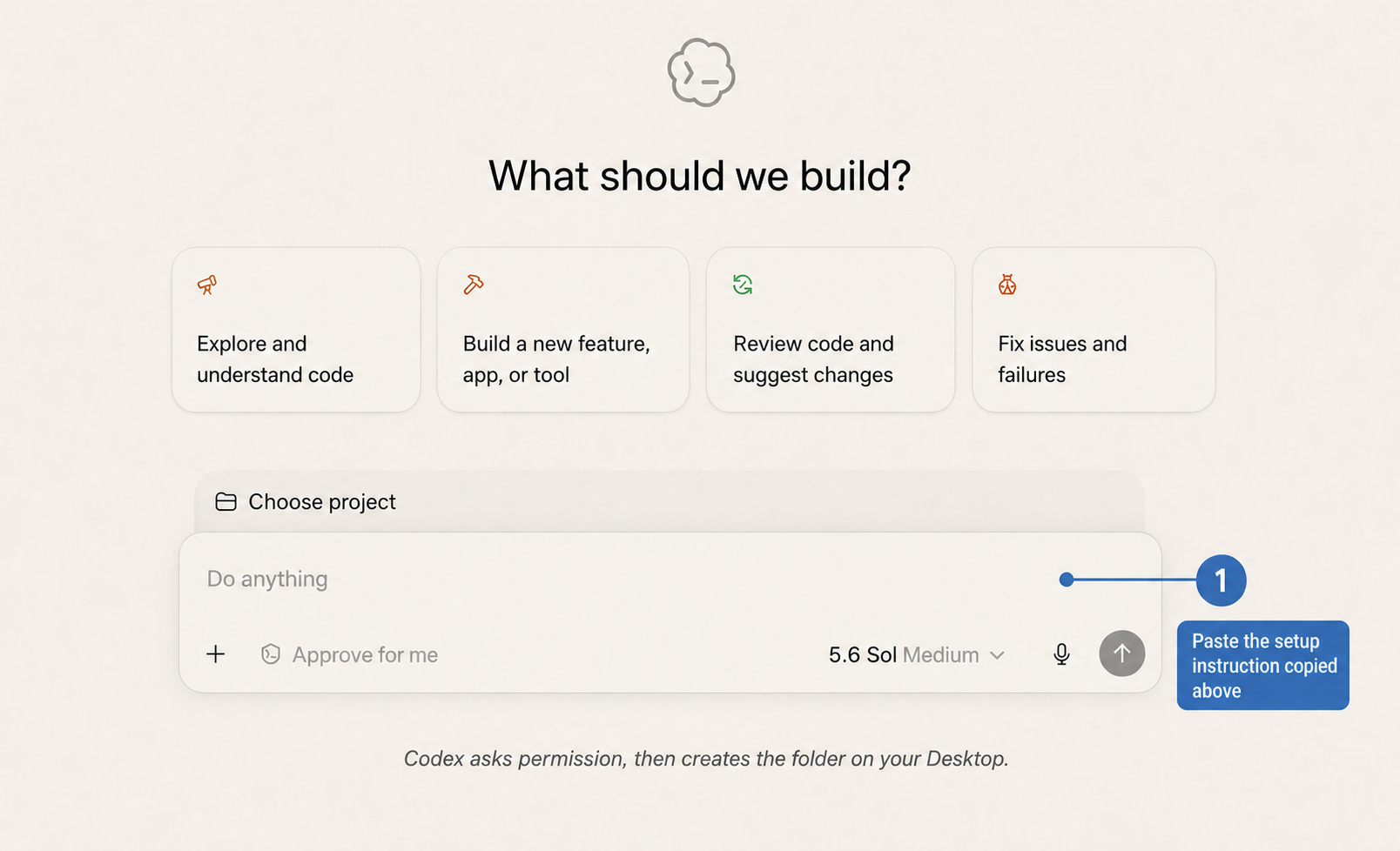
Paste the instruction into Codex. No project selection is needed. -
Approve setup and answer five questions
Codex asks before creating the folder. Enter your license key only when asked, then tell it how you work and choose your first workflow.
Choosing email? Gmail is requested only if you choose the email workflow.
-
Run your first workflow
You’re finished when Codex confirms the Chief of Staff folder, names the workflow that is ready, and runs it with you.
- news
- travel
- tasks
- custom
How Mac setup keeps you in control
Codex asks before it downloads the package or writes the Desktop folder. Your license key is used for the download and is not saved in your Chief of Staff folder.
Four steps with PowerShell and Codex
PowerShell installs your Chief of Staff locally. Codex then guides you through one useful first workflow.
-
Open PowerShell
Open the Start menu, search for PowerShell, and open it. Administrator access is not required.
-
Copy one setup command
Copy the command, paste it directly into PowerShell, and press Enter. Do not paste it into Codex, ChatGPT, or another chat.
View the setup command
[Net.ServicePointManager]::SecurityProtocol = [Net.SecurityProtocolType]::Tls12; $installer = Join-Path ([IO.Path]::GetTempPath()) ("install-chief-of-staff-" + [Guid]::NewGuid().ToString("N") + ".ps1"); Invoke-WebRequest "https://awair.me/setup/windows/1.0.0.ps1" -OutFile $installer -UseBasicParsing; if ((Get-FileHash $installer -Algorithm SHA256).Hash -ne "C30D1B70A421994B78CD01B734547DBDA43374818271F2C6C5BCCF671BE24FAF") { Remove-Item $installer -Force; throw "Installer verification failed." }; Unblock-File -LiteralPath $installer; try { & powershell.exe -NoProfile -ExecutionPolicy RemoteSigned -File $installer } finally { Remove-Item $installer -Force -ErrorAction SilentlyContinue } -
Enter your key and let setup finish
PowerShell confirms the Desktop folder and asks privately for your Gumroad key. The key is used for the download and is not saved in the folder or your command history.
-
Follow the final PowerShell message
PowerShell tells you whether it installed a new folder or updated an existing one.
If it says installed
Open the reported folder in Codex, then paste this instruction.
Read SETUP.md in this Chief of Staff folder. Finish onboarding and configure one starter workflow.If it says updated
Open the reported existing folder in Codex. Your update is complete—do not run
SETUP.mdagain.
How this Windows command keeps you safe
It downloads a temporary installer, checks its SHA-256 fingerprint, runs it with PowerShell’s RemoteSigned policy, and removes the temporary file afterward. It does not need administrator access.
Your Chief of Staff is ready when:
- You can open the reported Chief of Staff folder in Codex.
- Your working preferences are present and unchanged after an update.
- At least one workflow is ready to run.
What setup changes on your computer
Setup makes a temporary download and creates a chief-of-staff folder on your Desktop. Codex or PowerShell asks before it writes the folder.
Already have a Chief of Staff folder?
Setup safely updates an existing Chief of Staff installation. If that folder contains unrelated files, it uses the next available name, such as chief-of-staff-2, instead of overwriting them.
If something is off
Open the Chief of Staff folder in Codex and paste this. Codex checks the setup without overwriting your profile, preferences, projects, rules, or memory.
Check my Chief of Staff setup using https://awair.me/setup. Preserve all of my existing files and preferences.
Need a license key?
Get Chief of Staff self-serve, then come back here when you are ready to install it.